
Learning the Basics
Contents
There’s plenty of fun to be had in Audition, as well as plenty of challenges to conquer.
Learn about experience, beats, license tests, game modes, challenges and more in this handy guide to the popular online dancing game.
LEARNING THE BASICS
Audition is one of those games that anyone can start playing right away. It’s simple enough that everyone can hop right in but offers enough challenge for advanced players.
When you first log on you are taken to the server/channel listing. Each server is composed of several different channels, and in each channel there’s a lobby and user-created rooms. You can either make your own or enter one that’s already made, unless the room has a little lock symbol (password-protected). Rooms needing more players will have a “waiting” tag, while games in progress will show “playing” next to them. On the right side, there’s a list of users that are currently on this channel, along with their location (lobby or a room number).

Then you will create your character. There isn’t much available to start with, just some basic clothes and a single hair style. The real character customization comes later, we will cover that in the Fashion Mall chapter. basically, you pick your gender and give it a name.
Once you’re done, you are taken to town. The main building ahead is the TV Station, where you play against other people. The other large building is the Mall, where you can purchase clothes. The little UFO shows the player rakings. There are two other areas that aren’t active yet, but in other versions of the game one is your house and the other is a socializing place.
The game automatically places new players in a tutorial when you first enter the TV Station, so that you learn the game mechanics. The tutorial shows you only the bare minimum to start playing.
Once you’re done, you can go out there and play against other people. You start in the Beginner server, and once you pass your first License (more about that later) you can enter the Free server. I don’t know what’s the problem with the Intermediate server, but it crashes me every time I try to access it.
Each room can accommodate up to six players, and while you can play by yourself, you won’t earn any beats nor experience. You can join any room that’s not in play by clicking on it. If there’s a spot, you will be placed on the “dance floor”; if not, you will be in the back watching the game.
You can create your own room just as easily. Click Make a Room to start your own game. Your character will be displayed as the DJ, and you will be able to control everything from room type to game modes (we’ll cover those later), songs and sceneries. You can even invite or kick out players if you want.
Basic commands
/go room # : automatically takes you to the specified room number
/w username: whisper something to someone, it’s a private message (messages won’t go through if the person is not in the TV Station)
/to username: continous whispering to someone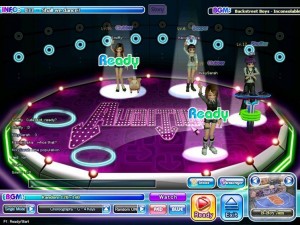
/wla : allows incoming whispers from everyone
/bl username: blocks that person from messaging you.
/bla : blocks everyone from whispering you
CTRL+S : brings up the volume control
/invon : turns on invitation decline feature
/invoff : turns off invitation decline feature
How to Play
Playing the game is done via the arrow keys and the space bar. Arrows will be displayed on the screen and you have to press them in the right order.
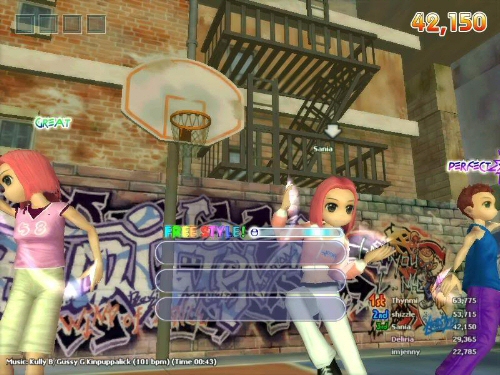
Your interface shows the arrow combos in the center, your total score on the top right and the song that’s playing and time remaining on the bottom left. Any chat lines appear temporarily on the left side of the screen.
The smaller bar above the arrow combinations will have a sphere and a shiny spot. When the sphere passes this spot, you hit the space bar to successfully do your move. Every time you do a move, you advance a level and get a new sequence with more arrows. If you fail your move, you go back to one arrow (not in all game modes though) and start again.
A perfect move happens when you hit the space bar at the perfect time. It takes practice to hit the right spot on the bar at the right time. Get several perfect in a row and watch how your score jumps.
You are awarded points for how well you do your moves. They rank from lower to higher in this order: Miss, Bad, Cool, Great, Perfect. The higher level you are, the more points your moves are worth.
| MOVE SCORES | |||||
| 1 | 1,200 | 900 | 600 | 419 | – |
| 2 | 1,500 | 1,125 | 750 | 524 | – |
| 3 | 1,800 | 1,350 | 900 | 629 | – |
| 4 | 2,100 | 1,575 | 1,050 | 734 | – |
| 5 | 5,400 | 4,050 | 2,700 | 1,890 | – |
| 6 | 6,400 | 4,800 | 3,200 | 2,240 | – |
| 7 | 7,400 | 5,550 | 3,700 | 2,590 | – |
| 8 | 8,400 | 6,300 | 4,200 | 2,940 | – |
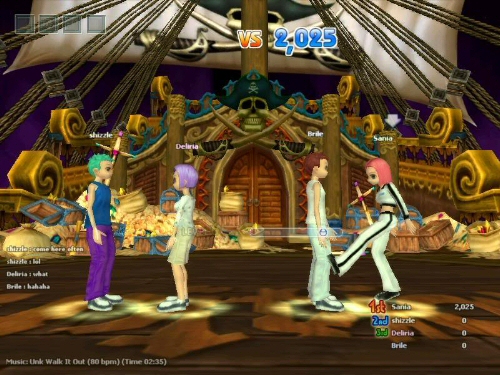 Usually, the person with the highest score will be dancing in the front, but that doesn’t happen in all game modes, since sometimes everyone takes turn coming to the front. There is also a competitive system that activates when someone makes a Perfect chain. The player who did the chain will have a blue circle around him and he/she will give the character ahead or behind in terms of score a yellow circle. While in the yellow circle, the player will lose points if he/she can’t do a Perfect. You will see little faces in blue, green, yellow and red above the characters at certain times during a dance session, those appear when this is happening.
In-game commands
Tab : changes arrows display
Ins : changes arrows to 8-key mode
Del : activates chance mode
F2 : switch camera view
CTRL+Q : used when watching a game to take you back to the lobby