
Owning and Managing a Store
Contents
OWNING A STORE
OPEN YOUR OWN SIM STORE
Creating a store isn’t so difficult, but you’ll need to have funds available to buy stock first (see Making Money). Once you think you have enough to get you started on your business, leave your lot and change your property category to “Shopping”, the gift box icon. Then you can go back to your lot and start buying some stock.
Switch to “Buy Mode” and select any object in your lot, just as if you’re buying something for your house. There will now be a new button that allows you to mark that object “For Sale” and set the price for it. Those items will now have a “Suggested Retail Price” as well as a “Sale Price”, which you assign to it. The suggested retail price is the standard catalog price for that item, while the sale price is what the store owner assigns to it.
To learn how you can advertise your store, see Tips for a Successful Property: Advertising Your Lot.
After you change your property into a Store lot, you will notice the items on the catalog will now come with several discount prices, depending on what you have bought so far. The discounts are higher if you concentrate on one kind of merchandise. The Sim who sells only lamps will have good discount prices, but the Sim who sells only one kind of lamp will have even a better discount.
ABOUT DISCOUNTS
There are two types of discounts: category discount and item discount.
The category discount refers to the number of objects available in the lot that belong to the same catalog category. When you buy a new chair, all the items in the seating category will be counted. This item count is based on the value of the other objects in that category, so if you have a really expensive chair and lots of cheap chairs, the cheap ones will count as partial items towards the total discount.
To find the catalog value of an item you must divide the catalog value of all the items in the category by the number of items in that category.
| Number of Items in Category | Percentage of Catalog Price |
| 0 | 100% |
| 1 | 97% |
| 2 | 94% |
| 3 | 91% |
| 4 | 88% |
| 5 | 85% |
| 6 | 82% |
| 7 | 79% |
| 8 | 76% |
| 9 | 73% |
| 10 | 70% |
The item discount works like the category discount, but it refers to the quantity of identical items in the lot.
| Number of Identical Items | Percentage of Catalog Price |
| 0 | 100% |
| 1 | 90% |
| 2 | 80% |
| 3 | 70% |
DEPRECIATION VALUE
As time goes by and with use, the value of an object goes down. The depreciated price will be calculated according to the original purchase price.
If you bought a table for $250 (after discount) that actually costs $350 in the catalog, the depreciation will be calculated on the discounted price that you acquired it for ($250). Being resold will have no depreciation value for an object. These factors contribute to lower resale values on stores, but you will still get the same benefits from the item you’re buying, with the advantage that repairs will cost less, since they’re calculated based on the original cost.
STORE IDEAS
There are a few things to consider before you choose the kind of shop you would like to have. Think about how other players can enjoy it and if they will actually buy from you, and decide on a layout and decoration (See also: Tips for a Successful Property: Themed Lots). Here are a few ideas that might serve as models for your future store.
The Thrift Store
Opening a store doesn’t necessarily mean you have to buy brand new stock. When in other lots, check for used goods that might be for sale, or ask if there are any broken objects for sale. You can make some profit out of this is you’re a good handyman and have the mechanical skill to fix things. You don’t have to specialize in any particular kind of articles, and you don’t have to worry much about decorating, just like real life Thrift Stores!
The Mini-Mall
If you can’t decide on a single type of store or merchandise, why not open a Mall? The best layout for a Mini-Mall would be a small building where you residence would be located, and a larger one for the Stores, and like every shopping mall, a food court and washrooms. You can have a small computer shop, a gift shop, a furniture shop, a boutique, all operating under the same roof. If malls attract mass quantities of people in real life, why wouldn’t they in the Sims community?
The Boutique
Clothing Racks made the Boutique dream come true. Sims can now buy new outfits, including swimsuits and new pajamas from the new racks.
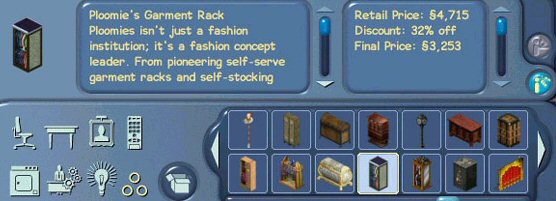
By placing Clothing Racks in your store, you will be able to select the “Manage” option from them. At first, you will see the racks are empty. You can stock each rack with a maximum of 20 outfits. To stock them, click on the pictures of the outfits you’d like to have for sale, and they will be added to the rack’s inventory. Choose carefully before you buy them, because if you delete an outfit from your rack, you will not be reimbursed.
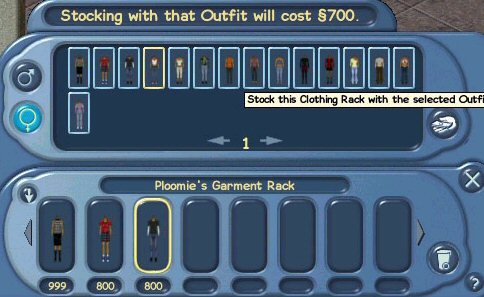
You can also name your Clothing Racks, in the Manage control panel, where you see a space for “Clothing Rack Name”. Lets say you name your rack “Chic’n’Cheap”. Then, every time someone wants to browse your rack, they will see “Browse Chic’n’Cheap”.
Just like the objects for sale, each outfit will have a “Retail Price” which you will set. To collect the money after sales, it works just as a vending machine or the slot machines: choose “Withdraw” from the menu.
Currently, these are the numbers of available outfits which you can stock your clothing racks with.
| Outfits | Swimwear | Sleepwear | Casuals | Formals |
| Male | 17 | 45 | 15 | 6 |
| Female | 31 | 42 | 15 | 10 |
Keep in mind that your dresser now has the ability to store these outfits to a limit of 3 swimwear, 3 sleepwear and 5 casuals. You can delete any outfit from your dresser at any time, but you won’t get a refund for it.
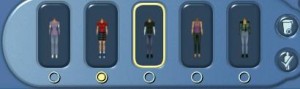
To change clothes, simply select the outfit you want to wear by checking the round button. To delete an outfit, click on its respective picture to highlight it. If you choose to delete your starting outfit (the one you created your sim with), you will lose it permanently.